.png?width=357&height=85&name=tpiq-logo%20(375x85).png)
When our team releases updates to strategies within the Tax Strategy Library, you’ll see options to accept or review those updates before applying them. This ensures you always have control over your customized strategies.
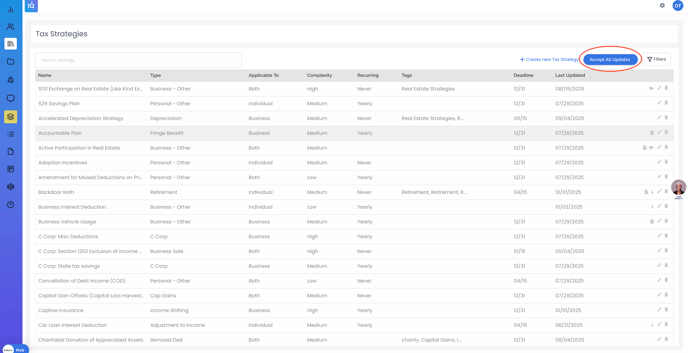
1. “Accept All Updates” Button
At the top right of the Tax Strategy Library, you’ll see the “Accept All Updates” button.
- Clicking this button applies all available updates at once.
- Important: If you’ve made your own edits to any existing strategy, this action will override and replace those changes with the newest version from our team.
- Only use this option if you want your library fully synced with the latest TaxPlanIQ updates.
2. Reviewing Individual Strategy Updates
If you prefer to evaluate each update individually, you can look for arrows displayed beside strategies in your library:
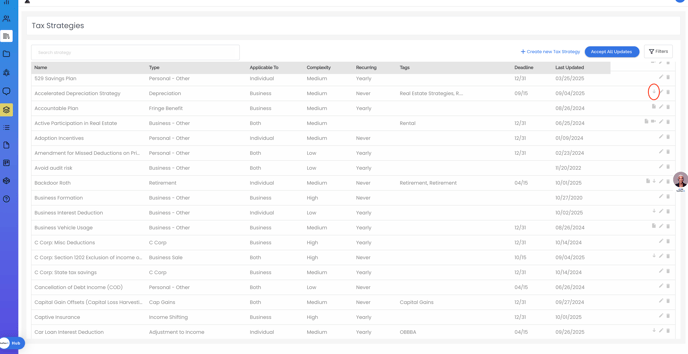
Grey Arrow
- A grey arrow appears next to strategies that have been updated by our team.
- Clicking this arrow updates that specific strategy only—overwriting any personal edits you’ve made to it.
- If you don’t wish to lose your custom edits, simply do not click the grey arrow. Your current version will remain as-is.
Red Arrow
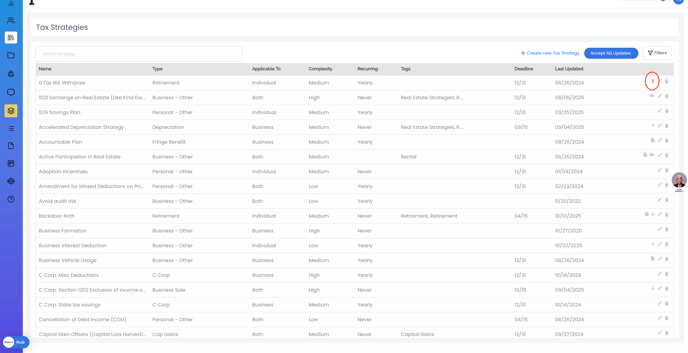
- A red arrow indicates a strategy that has been deleted by our team.
- Clicking the red arrow will remove that strategy from your library.
By choosing whether or not to click each arrow, you can keep your own customized versions or selectively apply only the updates you want.
3. Best Practices
- Evaluate updates one by one if you wish to retain your own edits or modifications.
- Use “Accept All Updates” only when you want to refresh your entire library with the latest published versions.
- Once submitted, the update may take up to 24 hours to complete. We recommend doing this during a low usage period or downtime.
- If you’re unsure whether to accept or skip a change, contact Customer Support at support@taxplaniq.com for guidance.
As of 10/7/25, we do not have a way to make a clone or duplicate of a strategy (in order to keep your changes and download ours). We are working on a solution.
Need Help?
If you have any questions about updates or encounter unexpected changes in your strategies, please contact Customer Support at support@taxplaniq.com for assistance.