.png?width=357&height=85&name=tpiq-logo%20(375x85).png)
The disclaimer that appears on the Return on Investment and Report sections is edited at the individual tax plan level. There is no single global setting to change it — updates must be made within each specific plan.
Steps to Edit the Disclaimer
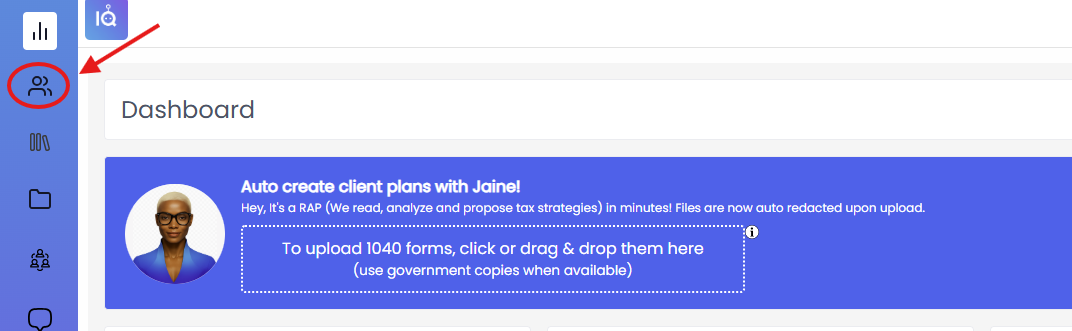
Step 1: Go to your Clients List Click the Clients icon in the left navigation menu.
Step 2: Select your client Find and click the name of the client whose disclaimer you want to update.

Step 3: Open the applicable tax plan On the client's page, scroll down to the Tax Plans section and click the name of the plan you want to edit.

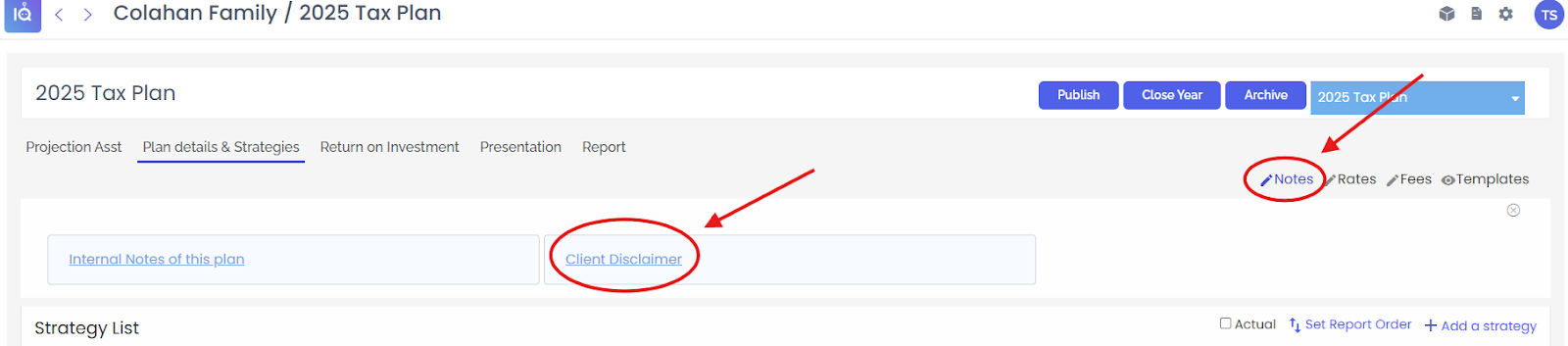
Step 4: Click "Notes," then select "Client Disclaimer" Inside the plan, click the Plan Details & Strategies tab. In the upper right area, click the Notes icon. A dropdown will appear with two options — click Client Disclaimer. You can now edit the disclaimer text for this plan.
Important to Know
- Changes made here only apply to this specific plan. If you need a different disclaimer on another plan, repeat these steps for that plan.
- There is no universal disclaimer setting that updates all plans at once.
- If you need additional help, please email support@taxplaniq.com